Digital Marketing
Preparing Your Google Business Profile for Diwali Success
Why the Profile Matters Right Before Diwali
When the Diwali lights go up on Marine Drive, my client’s bakery in Bandra was already seeing a 30% surge in phone calls, thanks to a tidy Google Business Profile. A clean, festive profile can be the difference between a full queue and an empty counter during the five‑day shopping rush.
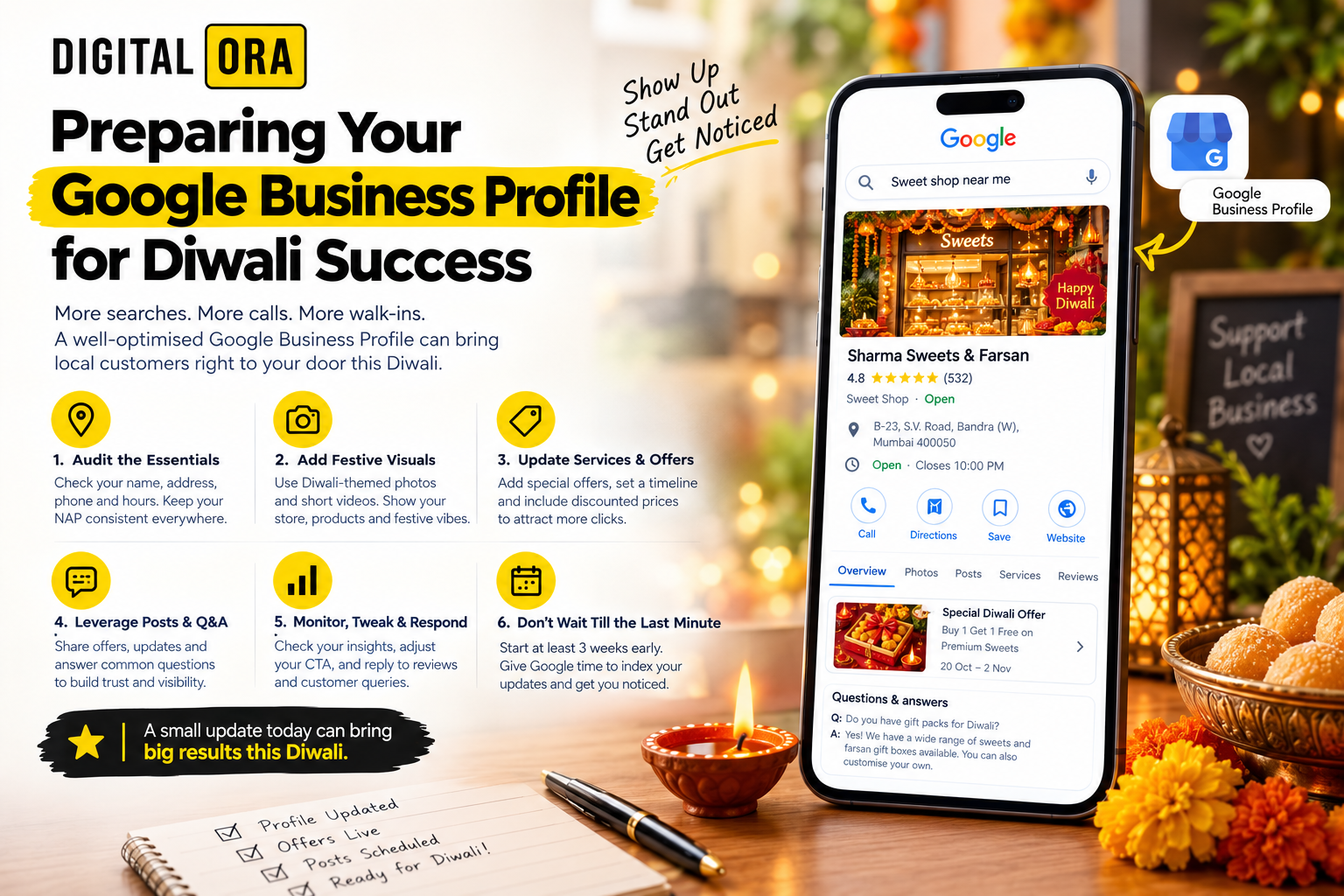
1. Audit the Essentials
Start with the basics – name, address, phone, and opening hours. A typo in the address of a Thane hardware store cost them three missed deliveries last year. Fixing it took under an hour but saved them roughly Rs. 8,000 in lost sales.
Check NAP consistency
- Match the address on your website, social pages, and Google Maps.
- Use the exact same format (e.g., "B‑23, S.V. Road, Bandra (W), Mumbai 400050").
- Test the phone number by dialing it from a mobile; if you get a wrong‑number tone, correct it now.
Confirm categories
Pick the primary category that truly describes you. A local sweets shop listed "Restaurant" and missed out on the "Sweet shop" filter that appears in Diwali searches. Switching categories added 120 new views in a week.
2. Add Festive Visuals
People scroll faster when the cover photo shines with Diwali vibes. Swap the usual storefront shot for a high‑resolution image of your shop lit with diyas or a rangoli display. Keep the file size under 1 MB – Google compresses larger files and they lose crispness.
Photos that convert
- One interior photo showing a ready‑to‑gift hamper.
- Two exterior shots – one plain, one with festive lighting.
- Short video (15‑30 seconds) of a staff member lighting a candle and saying “Happy Diwali”.
Upload these by the second week of October; that gives Google time to index and push them to the top of search results before the first purchase window opens.
3. Update Services & Offers
Diwali shoppers look for instant deals. Add a "Special Diwali Offer" attribute under the Services tab. For a Bandra boutique, we added a "Buy 1 Get 1 Free on silk scarves" line that drove an extra Rs. 12,000 in sales over three days.
Set a clear timeline
Google lets you schedule an offer start and end date. Set it from 20 Oct to 2 Nov – that covers the main shopping period and the post‑festival clearance. No need to remember to turn it off; the platform does it automatically.
Price transparency
Include the discounted price next to the regular price. A Thane electronics shop listed "LED TV – Rs. 22,999 (was Rs. 24,999)" and saw a 17% click‑through lift because shoppers instantly saw the saving.
4. Leverage Posts and Q&A
Google Posts work like a miniature social feed that appears in local packs. Write three to four short posts – one announcing the offer, one sharing a behind‑the‑scenes prep story, and one reminding customers of your extended Diwali hours.
Example post
"Diwali lights are on at our shop! 🎇 From 10 Oct we’re open till 9 pm to help you finish your gifting. Drop by for a complimentary mithai sample."
Each post stays live for seven days, so schedule them in advance using a spreadsheet. I usually set a reminder on Google Calendar to post every Monday, Wednesday, and Friday.
Answer common questions
Check the Q&A tab daily. A frequent query for a local tailor was, "Do you do custom embroidery for Diwali sarees?" Adding a concise answer ("Yes – 2‑day turnaround, Rs. 350 per saree") not only informs the asker but also appears for future visitors.
5. Monitor, Tweak, and Respond
Analytics matter. In the first 48 hours after you go live, look at the Insights panel. If you notice that most views come from mobile but the call‑to‑action button isn’t getting clicks, consider moving the phone number higher in the description.
Budget tip
If you have a modest ad spend – say Rs. 5,000 for a local boost – use it to promote your Google Post about the Diwali offer. That extra push can lift impressions by 30% without blowing the budget.
6. The Mistake I See Most
Businesses wait until the last minute, thinking “I’ll fix it on the day of Diwali.” The result? Incomplete indexing, missing photos, and a half‑filled offer field. I’ve watched a Khar West salon lose a full day of bookings because they updated the profile only two days before the festival. The lesson: start the checklist at least three weeks ahead.
Takeaway Action
Pick one item from the list – update your opening hours for Diwali, add a festive cover photo, or post a special offer – and get it done before 15 Oct. A single, timely tweak can already put your business in front of the shoppers walking the streets of Mumbai.
Related Reading
Share this article
Grow Your Mumbai Business Online
Get a free ₹15,000 digital marketing audit.
No commitment. Results guaranteed.